# GentleOS: Two Brand-New Operating Systems for PCs Nobody Uses Anymore
- **Published on:** 2026-09-12
- **Category:** News
- **Original page:** https://linuxgratis.com/en/articles/gentleos-systems-for-vintage-pcs
GentleOS/32 boots on a 386 with 1 MB of RAM and GentleOS/16 goes all the way down to an 8086 with a CGA display. Both are free software, written in plain C, and useless for anything practical. That's the whole point.
---
Back in June two operating systems showed up on Hacker News that are of no practical use whatsoever, and still collected close to a thousand GitHub stars between them. They are called **GentleOS/32** and **GentleOS/16**, they come from a developer who goes by **luke8086**, and they boot on machines you would find in a skip today: a 386 with one megabyte of RAM for the first one, an 8086 with a CGA display for the second.
Both are free software under GPLv2 and both have just joined our catalogue, in the [Historic](/en/historic) section, alongside [KolibriOS](/en/kolibrios), [SerenityOS](/en/serenityos) and [TempleOS](/en/templeos). Their entries live at [GentleOS/32](/en/gentleos32) and [GentleOS/16](/en/gentleos16).
## Firmware with windows
The author puts it plainly on the project site: GentleOS does not try to imitate a general-purpose system. It is designed more like microcontroller firmware, monolithic from top to bottom and compiled into a single binary. Everything is written in plain C with small pieces of assembly, and the source is meant to be read and understood.
The list of what it leaves out is more telling than the list of what it includes. No virtual memory, no userspace, no preemptive multitasking, no persistent storage, no networking. No web browser either, and no way to run third-party apps. It supports the standard hardware of a period PC and little else: VGA or SVGA, keyboard, PS/2 or serial mouse, and the internal speaker. The author's stated plans are refactoring, bug fixes, optimisation and a few more apps. No promises about turning it into something else.
## GentleOS/32: a 386 and one megabyte
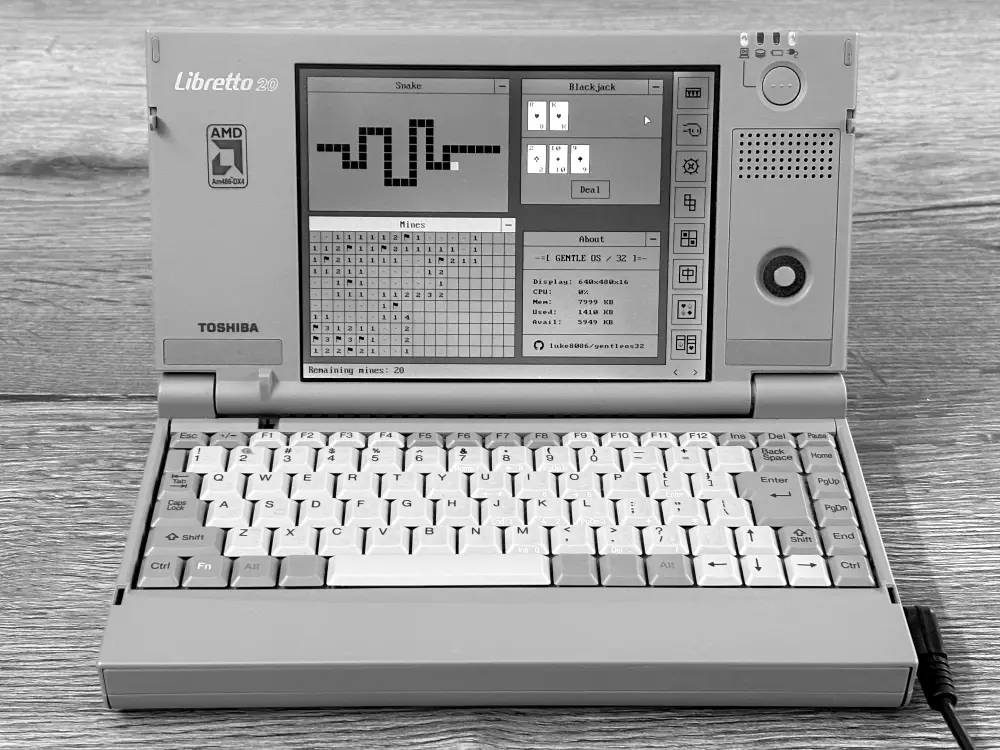
GentleOS/32 on a Toshiba Libretto 20, the pocket subnotebook with an AMD 486 DX4. · Foto: luke8086 / GentleOS/32 · GPL-2.0
The 32-bit version asks for an i386 processor, 1 MB of memory, a mouse and a VGA display capable of 640x480 in 16 colours. The humblest configuration the author has tested is a 386SX at 16 MHz with exactly that megabyte. At the other end the limit is not power but boot method: the machine has to support BIOS or legacy boot, because a pure UEFI system provides no PS/2 keyboard and mouse emulation and GentleOS goes deaf.
It comes in four flavours. The `gentleos32-base.img` image is written straight to a 1.44M, 720K or 360K floppy, a hard disk or a USB stick. `gentleos32-emu.img` is the same thing with extra assets, padded with zeros so emulators accept its geometry. `gentleos32-grub.img` adds GRUB 2 and raises the requirement to 4 MB. And `gentleos.bin` is the bare kernel, bootable from GRUB 2, GRUB Legacy or GRUB4DOS.
Even without persistent storage you can still feed it content. An initial RAM disk lets you add wallpapers and songs: monochrome images are stored at one bit per pixel to save memory and tinted with colours you pick in settings, while music goes in as MusicXML and is converted to a small format for the PC speaker.
## GentleOS/16: down to the 8086
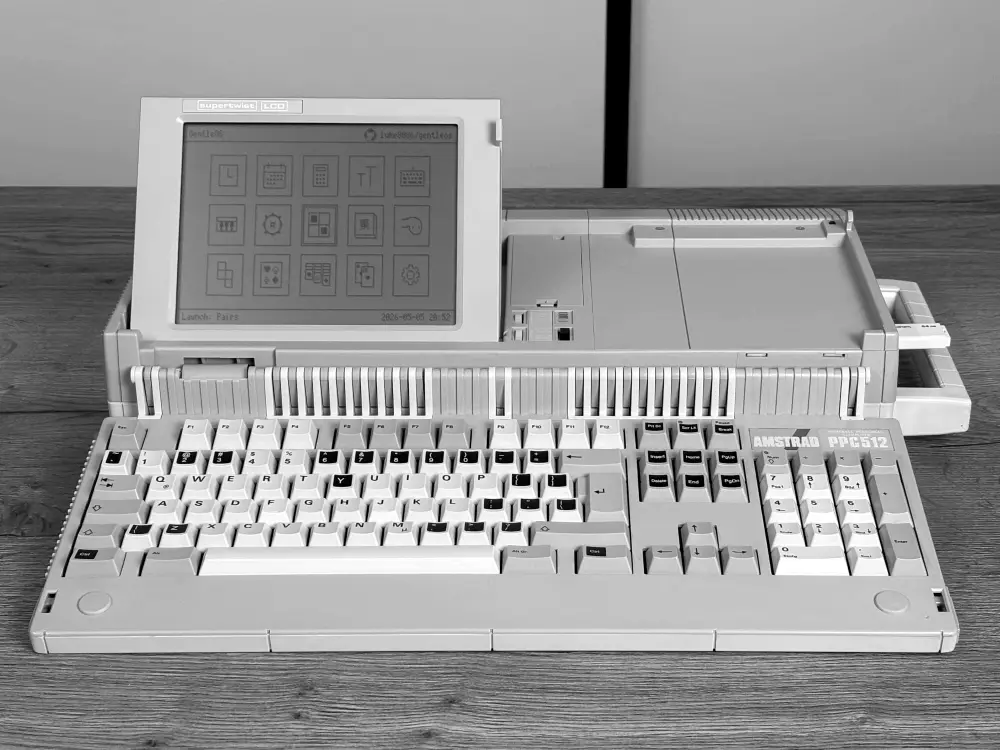
GentleOS/16 on a 1987 Amstrad PPC 512: NEC V30, 512 KB of RAM and a CGA display. · Foto: luke8086 / GentleOS/16 · GPL-2.0
The 16-bit version is GentleOS/32 trimmed as far as trimming goes. All it needs is an 8086 and a CGA display in 320x200 with four colours, that palette anyone who touched a PC in the eighties recognises instantly. The weakest hardware the author has tested is a NEC V20 with 512 KB of RAM.
Even so it ships a desktop with a launcher, clock, calendar, calculator, font picker, sound and keyboard settings, plus a decent run of games: Tetris, Snake, minesweeper, mahjong, pairs, blackjack, Klondike and FreeCell. It boots from floppy or, if you would rather not touch the disk, runs as `GENTLEOS.COM` from [MS-DOS](/en/ms-dos) or [FreeDOS](/en/freedos), returning to the shell with Shift-Q.
There is a nice detail in the repository's contributors section: Alexander Rau got the system running on an **HP 200LX**, the palm-sized pocket computer HP sold in the early nineties, and published his own adapted release.
## Trying it without digging out a laptop
You do not need a 386 in the attic. Both project sites embed a PC emulator that runs in a desktop browser, so the whole system boots with one click and nothing to install. It is the quick way to see what this is about before deciding whether writing a floppy is worth your afternoon.
If you would rather build it, that is not an ordeal either. GentleOS/32 compiles with Docker Compose and a single command, `docker compose run --rm dev make -j4`. GentleOS/16 is even more direct: the repository bundles the entire toolchain (OpenWatcom 1.9, NASM and Perl), so the only prerequisite is DOSBox. Mount the directory, run four commands and you have your image. Anyone with a copy of Turbo C 2.01 lying around can use it instead and compile considerably faster.
## A project made by hand
Both sites carry a line at the top that says a lot in 2026: *"Project handcrafted by a human"*. The backstory fits. The author started tinkering with OS development around 2007, following the well-known JamesM tutorial, and kept coming back to it without a clear idea of where to take it. During the pandemic he got into buying and restoring old laptops from local auction sites, the sort people sell when clearing out an attic without knowing whether they even power on. After a couple of years watching them gather dust on a shelf, he took his codebase, stripped out everything unnecessary, ported it back to 32 bits and turned it into a system built specifically for those machines.
The gallery photos are real, shot on an iPhone 16 with a softbox and given only minor trimming, white balance and contrast work in GIMP. The 64 GB USB sticks plugged into eighties computers are not a joke either: they are Gotek emulators standing in for the original floppy drives, far more convenient for development than fighting with 720K disks.
As for contributing, the author warns that he does not take pull requests because he already reviews plenty at work. If you do something interesting with the code, he would rather you sent him an email about it.
## Where this fits
GentleOS competes with nothing. It is not [FreeDOS](/en/freedos), which genuinely aims to be useful on an old PC, and it is not chasing the full desktop of [Haiku](/en/haiku) or the ambition of [SerenityOS](/en/serenityos). It is something else: a small, readable, finished system that exists so somebody can switch on a laptop from 1993 and see something pleasant on screen.
In a catalogue full of distributions that refresh every six months and enterprise systems with ten-year support calendars, these two fill an odd and welcome gap. If you have a nineties machine gathering dust, your weekend is sorted. If you do not, the browser emulator is one click away.