# Lightweight Desktops: XFCE, LXQt and Openbox to Revive Your PC
- **Published on:** 2026-09-07
- **Category:** News
- **Original page:** https://linuxgratis.com/en/articles/lightweight-desktops-xfce-lxqt
A practical guide to lightweight Linux desktops: XFCE, LXQt, Openbox and MATE. Low RAM usage and snappy performance on modest or aging hardware.
---
Not everyone needs GNOME's sweeping animations or KDE Plasma's visual firepower. Maybe you own a ten-year-old laptop, a machine with 2 or 4 GB of RAM, or you just want the system to boot fast and keep the memory free for your actual work. That is where lightweight desktops come in. This article walks through the three classic minimalist environments on Linux —XFCE, LXQt and Openbox— and where each one fits.
## Why Choose a Lightweight Desktop
The desktop environment is the layer that draws windows, panels, menus and notifications. The lighter it is, the fewer resources it eats and the faster it responds, especially on machines with little RAM or no dedicated graphics card. A lightweight desktop can boot on roughly 300 to 600 MB of RAM, while full environments hover around or exceed a gigabyte right after login.
This matters for two reasons. The first is practical: you stretch the useful life of hardware that would crawl under a modern version of Windows. The second is about efficiency. Even on a modern PC, spending fewer resources on the desktop frees up memory and CPU for the browser, the compiler or the virtual machine you actually care about.
## XFCE: The Balance Between Light and Capable
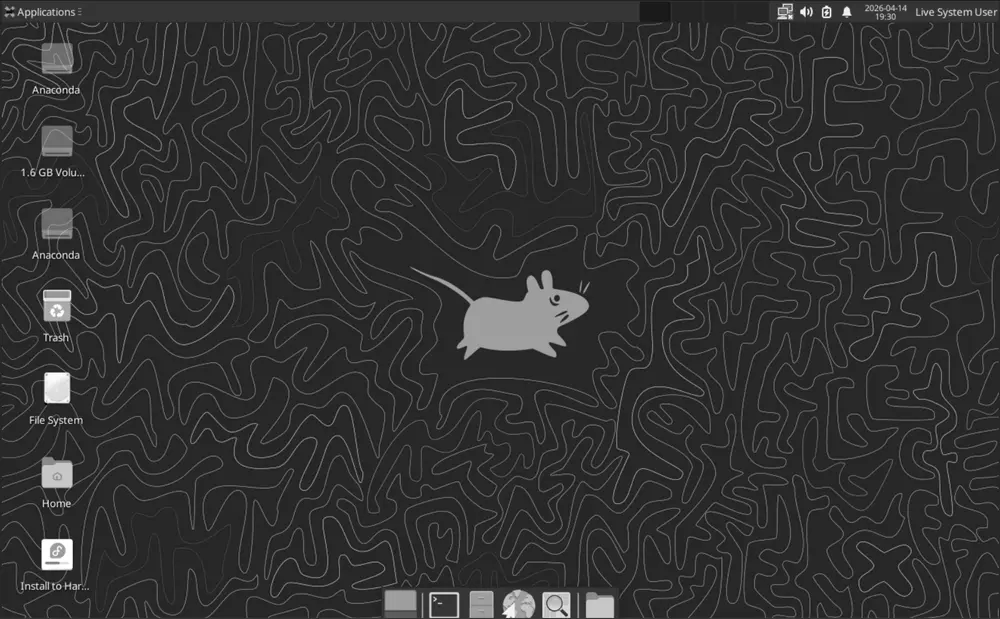
The XFCE desktop on Fedora 38: lightweight yet with a full panel, menu and file manager. · Imagen: The Fedora Project / GPL · Wikimedia Commons
XFCE is probably the most popular and best-loved lightweight desktop. Built on the GTK libraries, it has spent more than two decades refining a tricky balance: staying light without dropping the features we now take for granted, like a full file manager (Thunar), a configurable panel, its own compositor and a coherent settings center.
[XFCE 4.20](https://www.xfce.org/about/news/?post=1734220800) shipped on 15 December 2024 after almost two years of development, and it took an important step: the codebase got experimental Wayland support, scaling improved on HiDPI displays, and Thunar was tuned to handle over 100,000 files without breaking a sweat. It is the default desktop on [Xubuntu](/en/xubuntu) and a widely adopted option on [Debian](/en/debian), [Fedora](/en/fedora) and [Manjaro](/en/manjaro).
If you come from Windows or GNOME 2 and want something familiar, productive and that won't make you relearn everything, XFCE is the safe bet.
## LXQt: The Bare Minimum, on Modern Qt
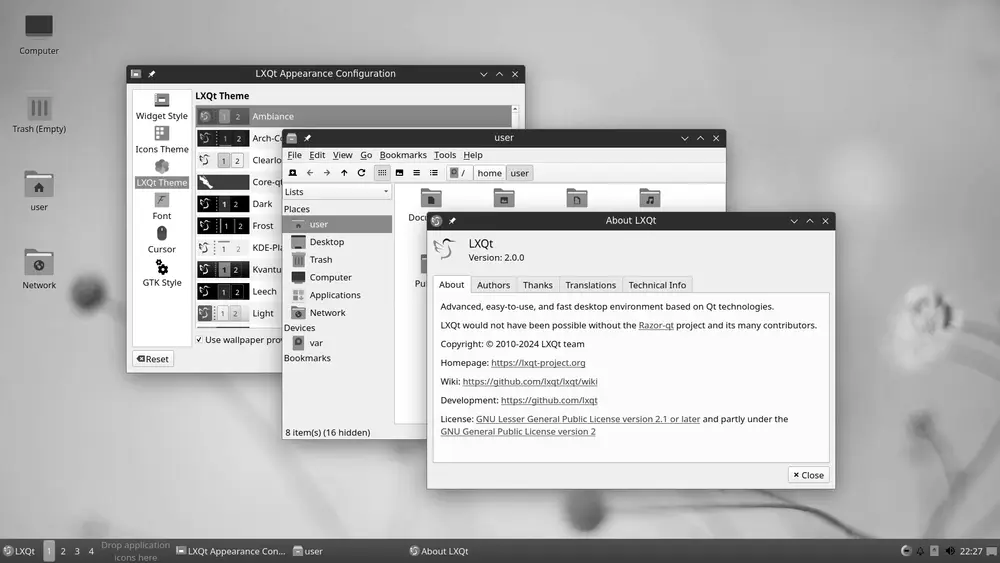
LXQt 2.0.0 with the Ambiance theme: a complete, modern Qt-based desktop with minimal RAM usage. · Imagen: LXQt developers / CC BY-SA 3.0 · Wikimedia Commons
[LXQt](https://lxqt-project.org/) came out of merging the veteran LXDE with Razor-qt, and it is now the spiritual successor to LXDE. Its biggest difference from XFCE is what sits underneath: it uses the Qt toolkit instead of GTK, which makes it especially light and a good fit if you already run Qt or KDE applications.
LXQt is the flagship desktop on [Lubuntu](/en/lubuntu), the official Ubuntu flavor aimed at modest hardware. The recent [LXQt 2.3.0](https://lxqt-project.org/release/2025/11/05/release-lxqt-2-3-0/), from November 2025, dropped the "experimental" label from its Wayland session and introduced the "Fancy Menu", with real categories and inline search. Lubuntu 26.04 LTS is also the first LTS release of Lubuntu shipping a mostly Qt 6-based environment.
If you want the lowest possible RAM footprint while keeping a full, modern-looking desktop, LXQt is hard to beat. Distros like [antiX](/en/antix) and others built for old machines put it to good use.
## Openbox: The Extreme Minimalism of a Window Manager
Openbox is not a full desktop but a window manager: the most basic piece, the one that only draws and arranges windows. By default it ships with no panel, no desktop icons and no file manager. You decide what to add.
That makes it extremely configurable and lightweight. In fact, Openbox is the standard window manager inside LXDE and frequently rides along with LXQt. One curious detail: it has been [considered a "complete" project](https://openbox.org/) for years, stable, largely bug-free, with occasional maintenance only when something needs it. That maturity is exactly what appeals to people who build custom desktops on top of [Arch](/en/arch), [Gentoo](/en/gentoo) or [Alpine Linux](/en/alpine-linux).
Openbox is great if you enjoy assembling your environment piece by piece, watching every kilobyte and working mostly from the keyboard.
## MATE: Carrying On GNOME 2
MATE deserves a special mention as the continuation of the classic GNOME 2. When GNOME jumped to version 3 and changed its philosophy from the ground up, part of the community rescued the GNOME 2 codebase to keep that traditional desktop alive. MATE weighs a little more than LXQt or Openbox, yet stays noticeably lighter than today's GNOME or KDE, and it feels instantly familiar to anyone who misses the old menus and panels. You'll find it on [Ubuntu](/en/ubuntu), [Linux Mint](/en/linuxmint) and plenty of other distributions.
## Which One to Choose
The rule of thumb is simple. Want a full, comfortable desktop on modest hardware? Go for XFCE. Need to squeeze every megabyte of RAM on a modern Qt base? Try LXQt. Love total customization and extreme minimalism? Openbox awaits. And if you come from the old school of GNOME 2, MATE will make you feel at home.
The best part of Linux is that trying them costs nothing: many distributions offer official "spins" or editions with each of these environments, and you can always install several and pick your favorite at the login screen. Your aging hardware still has plenty of life ahead.