# Namespaces and cgroups: the kernel pieces behind containers
- **Published on:** 2026-09-18
- **Category:** News
- **Original page:** https://linuxgratis.com/en/articles/namespaces-and-cgroups
Learn how Linux namespaces isolate processes and cgroups cap resources inside the kernel. The real foundation of Docker, Kubernetes and systemd, explained step by step.
---
Spin up a container with Docker or deploy a pod on Kubernetes and it feels like magic: an isolated, lightweight system with its own memory limits, ready in milliseconds. There is no magic here. Behind that illusion sit two mechanisms baked into the [Linux kernel](/en/linux-kernel) that have been maturing for well over a decade: **namespaces** and **cgroups**. Once you understand how they work, you become a much more capable administrator, because containers stop being a black box and turn into something you can inspect, debug and tune.
## What each piece actually solves
They are worth keeping apart, because they do different jobs that happen to complement each other.
**Namespaces** control *what a process can see*. They isolate a process's view of the system: which other processes exist, which network interfaces are present, which mount points show up, or which users are defined. A process inside a PID namespace believes it is PID 1, the init process, even though on the host it is just one of thousands.
**cgroups** (control groups) control *how many resources a process can consume*. They limit and account for CPU, memory, disk bandwidth and input/output operations. Without them, a single runaway process could devour all the RAM and bring the machine to its knees.
So: namespaces give isolation, cgroups give limits. A container is really just a normal process wrapped in a combination of both.
## The namespaces, one by one
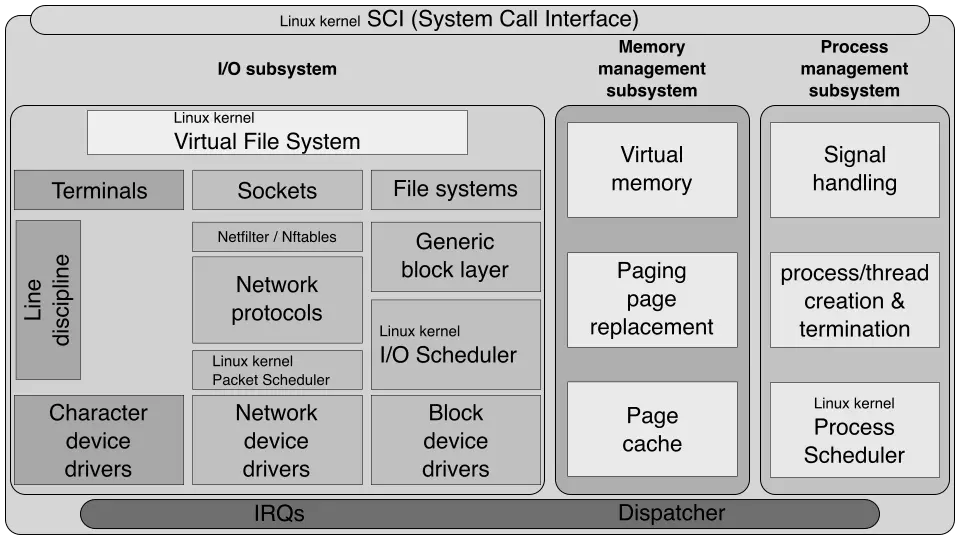
Simplified structure of the Linux kernel: namespaces operate at this layer of the system. Diagram by ScotXW (CC BY-SA 4.0). · Imagen: ScotXW / CC BY-SA 4.0 · Wikimedia Commons
The kernel currently offers eight namespace types. Each one isolates a specific aspect of the system:
- **PID**: isolates process identifiers. The first process in the namespace becomes PID 1.
- **Network (net)**: an independent network stack, with its own IP addresses, routing table, sockets and firewall rules.
- **Mount (mnt)**: its own list of mount points, so you can mount and unmount without affecting the host.
- **UTS**: isolates the hostname and the NIS domain name.
- **IPC**: isolates System V style inter-process communication and POSIX message queues.
- **User**: maps user identifiers, letting a process be root (UID 0) inside the namespace without being root on the host.
- **Cgroup**: provides an isolated view of the cgroup hierarchy.
- **Time**: lets a container have its own monotonic and boot-time clocks.
They did not all arrive together. The UTS and IPC namespaces appeared in kernel 2.6.19 (2006), the PID namespace was finalised in 2.6.24 (2008), the network namespace was largely complete by 2.6.29 (2009), and the user namespace was considered functional in kernel 3.8 (2013). The cgroup namespace landed in 4.6 (2016) and the time namespace, the newest one, was merged in kernel 5.6 (March 2020). This was slow, gradual evolution rather than one big launch.
## cgroups: resource limits with a Google backstory
cgroups were born at Google. Back in 2006, engineers Paul Menage and Rohit Seth started building a feature they then called *process containers*. In late 2007 it was renamed *control groups* to avoid confusion with the overloaded word "container", and it was merged into the mainline kernel in version **2.6.24**, released in January 2008.
That first version, the one we now call cgroups v1, allowed multiple independent hierarchies for different controllers. It worked, but it was complex and prone to inconsistencies. So **cgroups v2** came along, merged in kernel 4.5 (2016), with a *unified hierarchy*: a single tree where all controllers live together coherently. Today cgroups v2 is the default on modern distributions such as [Ubuntu](/en/ubuntu) 22.04 or later, [Fedora](/en/fedora) 31+, [RHEL](/en/rhel) 9+ and [Debian](/en/debian) 11+.
## How systemd, Docker and Kubernetes use them
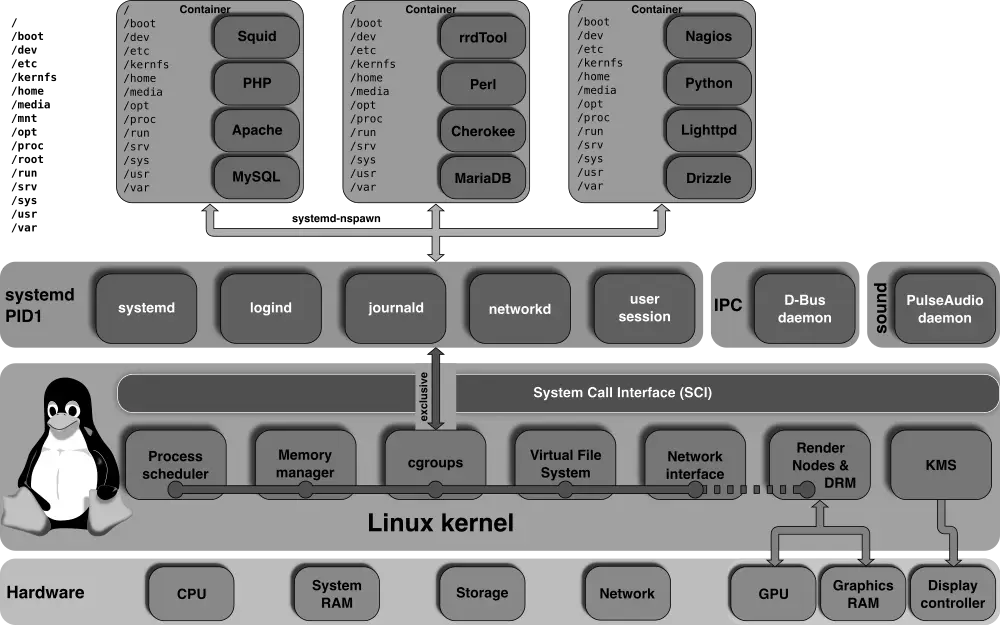
Unified cgroups hierarchy and its management through systemd, the basis of resource limits in Docker and Kubernetes. Diagram by ScotXW (CC BY-SA 3.0). · Imagen: ScotXW / CC BY-SA 3.0 · Wikimedia Commons
This is where everything clicks into place. **systemd**, the init system on most distributions, uses cgroups to put each service into its own *unit* and apply limits to it. When you set `MemoryMax` on a service, you are writing to a cgroup without even realising it.
**Docker** combines namespaces (for isolation) with cgroups (for limits) every time you run `docker run`. Pass `--memory` or `--cpus` and you are configuring a cgroup directly. **Kubernetes** does the same at scale: every pod gets its own resource group, and since version 1.25 it supports cgroups v2 in stable form. It has already deprecated cgroups v1.
Minimalist distributions like [Alpine Linux](/en/alpine-linux), a hugely popular base for container images, rely on these exact same kernel mechanisms. Whether the container weighs 5 MB or 500 MB makes no difference: underneath there are always namespaces and cgroups doing the work. And if lightweight virtualisation interests you, distributions such as [Gentoo](/en/gentoo) or [Arch](/en/arch) let you compile a custom kernel and tinker with these options directly.
## Try it yourself
You do not need Docker to play with these mechanisms. The `unshare` command creates namespaces on the fly: `sudo unshare --pid --fork --mount-proc bash` drops you into a PID namespace where your shell is PID 1. For cgroups, just explore `/sys/fs/cgroup` and watch the control hierarchy your system is already using right now.
Understanding namespaces and cgroups is not technical trivia. It is the difference between blindly trusting your containers and knowing exactly why one runs out of memory, or why two processes can see each other when they should not. These are the kernel pieces that hold up all modern infrastructure, sitting right there, accessible, waiting for you to explore them.