# Palm OS: the system that put computing in your pocket
- **Published on:** 2026-05-14
- **Category:** News
- **Original page:** https://linuxgratis.com/en/articles/palm-os
The history of Palm OS, the operating system behind the PalmPilot PDAs: origins, key versions, Graffiti handwriting and its legacy before smartphones.
---
Long before the iPhone and Android took over our pockets, a small, grey, quiet device taught millions of people to trust their calendar, contacts and notes to a screen. That device ran **Palm OS**, an operating system that for more than a decade defined what portable computing meant.
## The origins: Jeff Hawkins and Palm Computing
The story starts in 1992, when American inventor **Jeff Hawkins** founded **Palm Computing, Inc.**, a company focused on software for the earliest personal digital assistants (PDAs). After working on the ill-fated Zoomer device, Hawkins took away one decisive lesson: teaching people to write a little differently was easier than teaching computers to understand free-form handwriting.
In 1995 Palm merged with U.S. Robotics, and Hawkins led the development of an in-house operating system for a new line of devices.
## The PalmPilot and the birth of a phenomenon
On **10 March 1996**, the **PalmPilot 1000** and **PalmPilot 5000** reached the market as the first PDAs to run **Palm OS 1.0**. They had a monochrome 160 × 160 pixel screen and a dedicated area for writing with a stylus.
The success was overwhelming. The system's reliability and ease of use drove rapid adoption: by 1998 more than one million units had sold, capturing over 70% of the U.S. PDA market. A fun fact: the original name was simply **Pilot**, but a lawsuit from Pilot Pen Corporation forced a rebrand to **PalmPilot** and, later, just **Palm**.
## Graffiti: learning to write for the machine
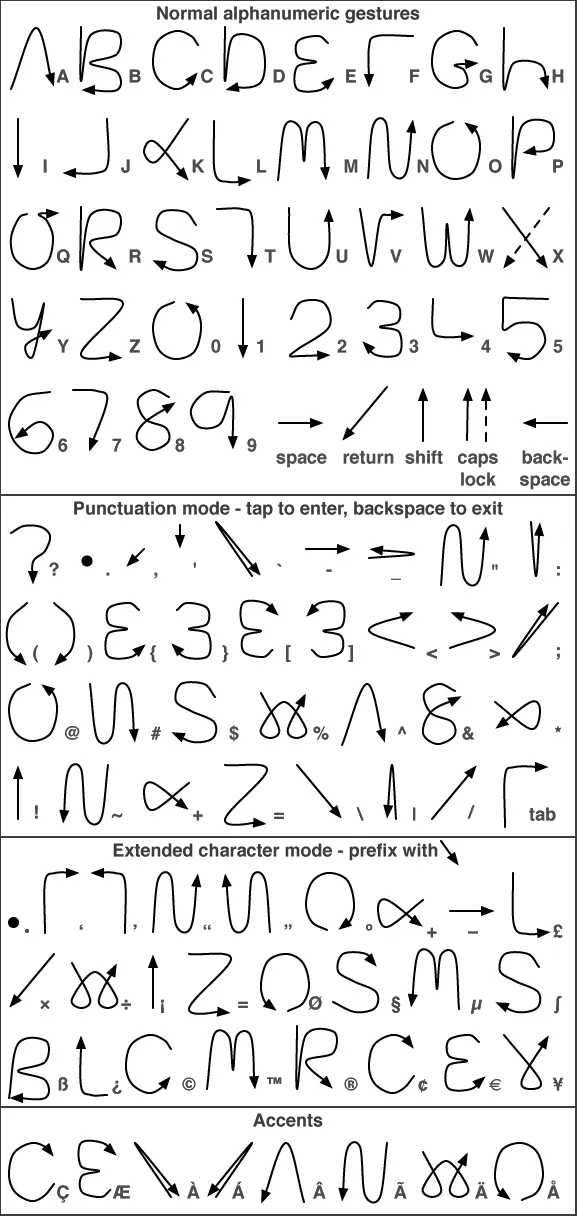
The single-stroke Graffiti alphabet, the handwriting system of Palm OS. · Imagen: No machine-readable author provided. IMeowbot~commonswiki assumed (based on copyright claims). / CC BY-SA 3.0 · Wikimedia Commons
Palm OS's big innovation was **Graffiti**, its handwriting recognition system. Instead of decoding any handwriting, Graffiti asked the user for a small effort: learning a simplified alphabet of single strokes. In return, it delivered astonishing speed and accuracy for the time.
Graffiti also left an interesting legal trail. Xerox held a patent for an input system called "Unistroke", developed at the legendary Xerox PARC, and sued Palm for infringement. So in 2003 Palm released **Graffiti 2**, based on Communication Intelligence Corporation's Jot technology, with strokes that looked closer to natural handwriting.
## The key versions of Palm OS
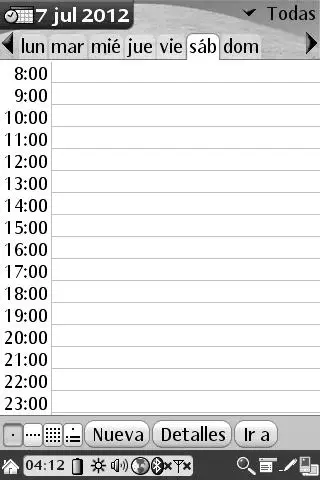
The daily agenda of Palm OS Cobalt 6.0, the last major version of the system. · Imagen: Frank Montero Figueroa / CC BY-SA 3.0 · Wikimedia Commons
The system evolved quickly. **Palm OS 2.0** (1997) added TCP/IP networking and backlighting. **Palm OS 3.0** brought display improvements and new capabilities. The big leap came with **Palm OS 5.0**, which the **PalmSource** subsidiary unveiled in June 2002 and debuted on the Palm Tungsten T: it finally moved to ARM processors, opening the door to colour, sound and far more power.
Two branches with gemstone names followed:
- **Palm OS Garnet** (5.4), which added Bluetooth and resolutions up to 480 × 320 pixels, and debuted on the Treo 650 in 2004.
- **Palm OS Cobalt** (6.0), introduced in 2004 and based partly on the **BeOS** technology Palm had acquired. It offered true multitasking and memory protection, yet never won over manufacturers and barely reached commercial devices.
## The decline and the leap to webOS
By the mid-2000s the landscape had shifted. ACCESS acquired the technology and rebranded it as Garnet OS, while Palm, Inc. bet on a new path. In January 2009 the company unveiled **webOS**, a system built on Linux and web technologies that debuted on the sleek **Palm Pre**. It was the final farewell to classic Palm OS.
The legacy, though, endures. Concepts like one-button PC synchronisation (the famous **HotSync**), task-focused touch interfaces and the idea of a truly pocketable personal computer paved the way for modern smartphones.
## A place in computing history
Palm OS belongs to that lineage of systems that defined an era and then handed over the baton, as [NeXTSTEP](/en/nextstep), [BeOS](/en/haiku) —whose spirit lives on today in [Haiku](/en/haiku)— or the long-lived [QNX](/en/qnx) did in the embedded world. Against rivals such as [Windows](/en/windows-desktop) in its CE variant, Palm proved that less could be more: a simple, fast, focused machine won the hearts of millions of users. Today its memory lives on in emulators and in the minds of a whole generation that learned to write in strokes.
## Sources
- [Palm OS — Wikipedia](https://en.wikipedia.org/wiki/Palm_OS)
- [Graffiti (Palm OS) — Wikipedia](https://en.wikipedia.org/wiki/Graffiti_(Palm_OS))
- [Palm OS — Britannica](https://www.britannica.com/technology/Palm-OS)