Few technologies have reshaped how we build and ship software in the past decade the way containers have. We talk about Docker, about Kubernetes, about images that boot in milliseconds and travel unchanged from a developer’s laptop to a production cluster. Yet behind all that magic there’s no proprietary trick. There’s a handful of Linux kernel features that had been maturing for years before anyone said the word “container”. Understanding those pieces is how you understand why containers are so lightweight, and why, deep down, they lean so heavily on Linux.
A container is not a virtual machine

The most common misconception pictures a container as a tiny virtual machine. It isn’t, and the distinction matters enormously. A virtual machine emulates full hardware and runs its own operating system, with its own kernel, on top of a hypervisor. That means gigabytes of disk, minutes to boot, and a meaningful memory footprint just to exist.
A container, by contrast, shares the host’s kernel. No second operating system boots up. There are ordinary host processes that the kernel keeps isolated from one another, so each one believes it’s alone on the machine. That’s why a container starts in a fraction of a second and weighs a few megabytes instead of several gigabytes. The trade-off is clear: every container on a machine runs the same kernel, the host’s. You can’t run a different kernel inside a container.
Namespaces: the illusion of isolation
The first key piece is namespaces. A namespace wraps a global system resource in an abstraction that makes the processes inside it believe they own their own isolated instance of that resource. Linux offers several kinds: PID (a container’s processes get their own numbering and never see the host’s), Network (each container can have its own network stack, interfaces and IP), Mount (its own view of the filesystem), UTS (its own hostname), IPC, User and Cgroup.
Thanks to namespaces, a process running inside a container “sees” a system that looks entirely its own: its own PID 1, its own network, its own mount points. The kernel builds the illusion carefully, but from the inside it’s indistinguishable from a dedicated machine.
Cgroups: putting limits on resources
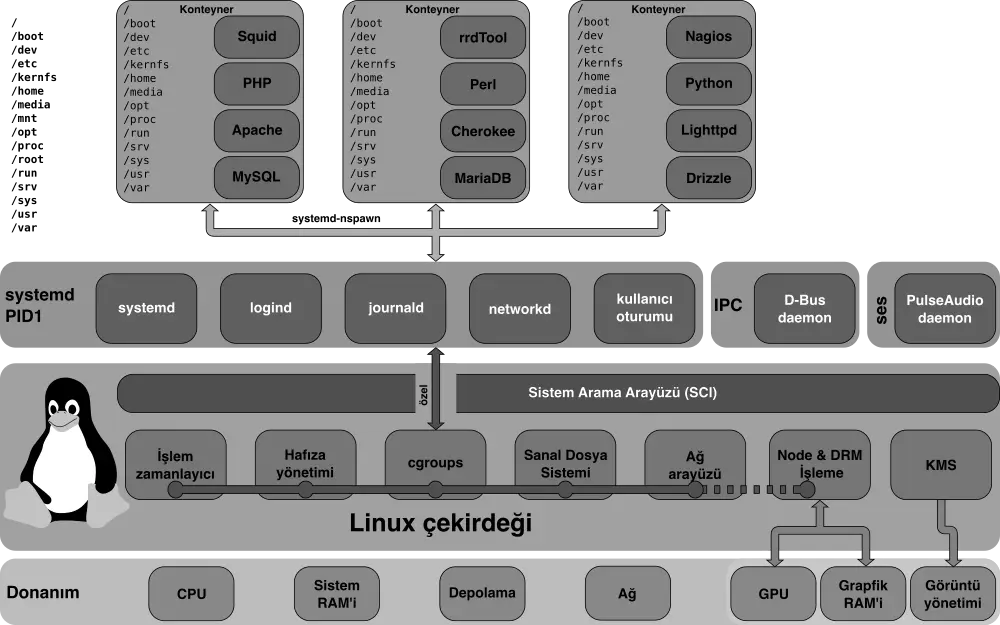
Isolation alone isn’t enough. You also have to stop one container from devouring all the CPU or all the memory and starving everyone else. That’s the job of control groups, or cgroups. This feature was born at Google in 2006-2007 under the name “process containers” and landed in the Linux kernel in version 2.6.24, released in 2008.
Cgroups let you measure and cap how much CPU, memory, I/O bandwidth or number of processes a group of processes may consume. If you launch a container capped at 512 MB of RAM, it’s cgroups that enforces that boundary at the kernel level. Cgroups version 2, now standard in modern distributions, unified the hierarchy and improved memory and I/O management quite a bit.
Capabilities and layered filesystems
Two more ingredients complete the picture. Capabilities break the old, all-powerful privileges of root into small, independent permissions. Instead of handing a container absolute power, you grant only what it needs (binding a low port, say) and strip away the rest, which sharply cuts the damage if something gets compromised.
The other piece is union filesystems, such as OverlayFS. They let you stack read-only layers and add a writable layer on top. This is exactly how images work: a base layer, layers of dependencies, your application on top, all shared between containers without duplicating data on disk. It explains why an Alpine Linux image takes up only a few megabytes, and why deploying the hundredth copy of an image doesn’t eat a hundred times the space.
From LXC to Docker, runc and the OCI standard
All of this technology existed, but scattered and hard to use. Projects like LXC already combined namespaces and cgroups to create isolated environments, yet the learning curve was steep. In 2013 came Docker, built at first on top of LXC, and it changed the rules with two brilliant ideas: packaging everything into portable images and offering a genuinely simple user experience. Suddenly “it works on my machine” stopped being an excuse.
Docker later replaced LXC with its own library, libcontainer, to talk to the kernel directly. And in June 2015 Docker, CoreOS and others founded the Open Container Initiative (OCI) to standardize the format. Docker donated runc, the reference runtime that implements the OCI specification and which today executes containers underneath Docker, containerd and much of the Kubernetes ecosystem.
Why all of this matters
When you launch a container on Ubuntu, Debian or any distribution, you’re not using a black box. You’re orchestrating namespaces, cgroups, capabilities and OverlayFS, all from the host kernel. That’s why containers are Linux-native, and why on macOS or Windows Docker actually spins up a small Linux virtual machine underneath: it needs that kernel to work.
Grasping these fundamentals isn’t an academic exercise. It helps you debug networking or permission problems, see the real security boundaries of a container, and make better deployment decisions. Containers didn’t invent anything new. They put an elegant interface on top of two decades of Linux kernel evolution. And that, precisely, is their greatest achievement.