
Few technologies have reshaped how we run infrastructure as deeply as Kubernetes. What started as an internal Google project is now the de facto standard for deploying containerized applications, and the whole thing rests on the foundations of the Linux kernel. Ever wondered how a single platform can manage thousands of containers spread across dozens of machines without a human watching each one? The answer has a name: orchestration.
From Borg to Kubernetes

Kubernetes grew out of Google’s experience running containers at a scale few organizations ever reach. For years Google managed its internal workloads with a system called Borg, built in the mid-2000s. That accumulated knowledge gave rise to Kubernetes, which Google announced as an open-source project on 6 June 2014, the date many treat as its official birthday.
The project took off fast. Alongside the 1.0 release in 2015, Google donated Kubernetes to the newly formed Cloud Native Computing Foundation (CNCF), under the umbrella of the Linux Foundation. That handover to a neutral foundation made the difference: it gave the project vendor-independent governance and pulled in an enormous community. The name, often shortened to K8s (a K, eight letters, then an s), comes from the Greek word for “helmsman” or “pilot”. It fits something that steers fleets of containers.
Why it all depends on the Linux kernel
Here is the detail many people overlook: Kubernetes does not invent process isolation. It leans on the very same primitives every Linux container has used for years. Kernel namespaces isolate what each container can see (processes, network, filesystem, user IDs), while cgroups (control groups) limit and account for the resources it consumes: CPU, memory and I/O.
A container, at its core, is an ordinary Linux process with these boundaries applied. Kubernetes operates one level above: it decides which machine runs each container, how many copies to keep alive, and how to wire them together. That is why a cluster’s worker nodes are almost always Linux machines. Distributions such as Ubuntu and Debian are common on these nodes, and in enterprise environments with commercial support RHEL is widespread, along with its community-rebuilt cousins AlmaLinux and Rocky Linux.
Anatomy of a cluster
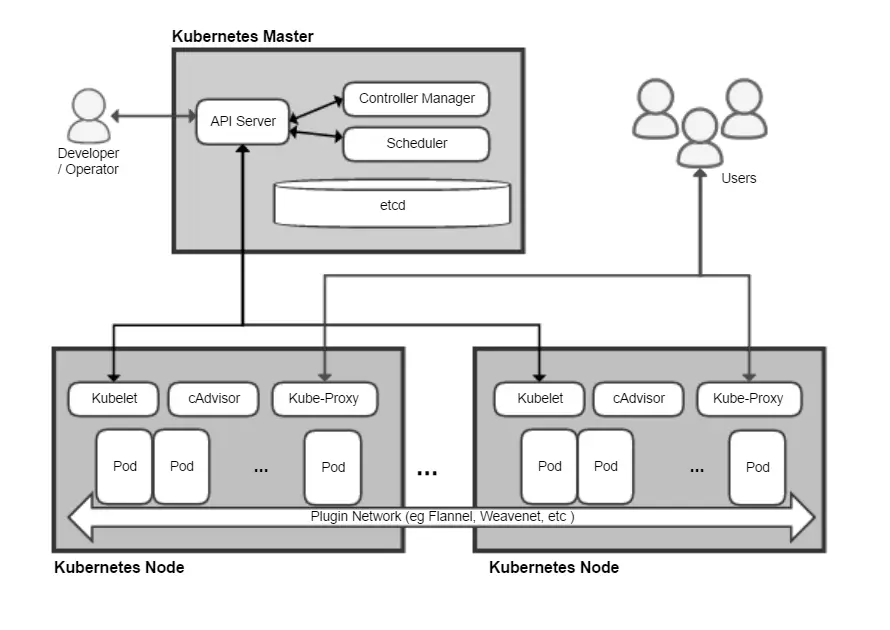
A Kubernetes cluster splits into two planes. The control plane is the brain: it holds the API server you talk to, the scheduler that decides where each workload lands, the state store (etcd), and the controllers that constantly check reality against what you asked for. The worker nodes are the muscle: they run the actual containers through an agent called the kubelet.
The smallest unit of deployment is not the lone container but the pod: a group of one or more containers that share networking and storage. Higher-level abstractions sit on top of pods, such as Deployments, which keep a desired number of replicas and allow rolling updates without taking the service down.
Deployment, scaling and self-healing
The real magic of Kubernetes lies in its declarative model. You do not issue step-by-step commands; you describe the final state you want (“I want five replicas of this app”) and the system works without rest to reach and hold it. If a node dies, Kubernetes reschedules its pods onto another healthy machine. If a container crashes, it restarts it. That is self-healing.
Scaling works both ways: you can add replicas by hand or configure an autoscaler that reacts to real load, spinning up more copies as traffic rises and retiring them as it falls. For resource-tight environments or minimal images, Alpine Linux is a popular container base thanks to its tiny footprint, which speeds up pulls and start-up times.
Container runtimes: the engine under the hood
Kubernetes does not run containers directly; it delegates that job to a container runtime that implements the CRI (Container Runtime Interface). For years the best-known option was Docker, but the project moved toward leaner, standard-aligned runtimes. In version 1.24, released in May 2022, Kubernetes permanently removed the dockershim component, the adapter that let it talk to Docker directly.
Today the dominant choices are containerd (the very engine Docker used internally) and CRI-O, built specifically for Kubernetes. It does not matter that your images were built with Docker: they keep working, because they follow the standard OCI format. Teams that needed to keep Docker as their runtime switched to an adapter called cri-dockerd.
Where to practise without breaking anything
You do not need a data center to learn Kubernetes. Tools like Minikube or kind spin up a full cluster on your own machine inside containers. On any modern desktop distribution, whether Fedora, openSUSE or Pop!_OS, you can experiment with deployments, scaling and simulated failures at no cost and no risk.
Kubernetes does not replace Linux: it amplifies it. It takes the building blocks the kernel has spent decades perfecting and orchestrates them at a scale that would be impossible to manage by hand. Understanding that relationship is the first step toward mastering modern infrastructure.