
If you have installed a recent distribution, chances are your desktop already runs on Wayland without you even noticing. For nearly four decades, Linux’s windowing system relied on technology born in 1984. Today, that long reign is coming to an end. Here is what changes, why it matters, and what you should expect.
Where we come from: the veteran X11
The X Window System, known as X11 after its eleventh version, was created at MIT in 1984. It is one of the longest-lived and most successful pieces of free software in history: almost every Linux desktop you have used over the past twenty years was built on top of it, most often through the X.Org Server implementation.
Its design reflected the needs of its era: a client-server architecture built for the network, where applications (the clients) could run on one machine and display on another over the wire. That flexibility was revolutionary in the 1980s, but four decades of patches, extensions and workarounds have turned it into a giant that is hard to maintain.
What Wayland is and why it was born
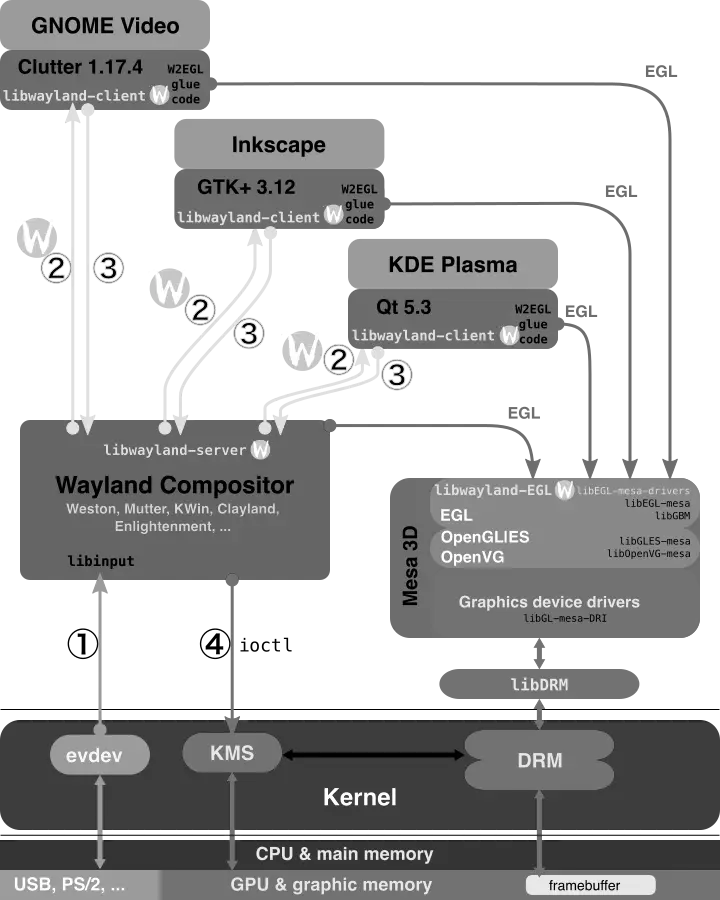
Wayland is a far simpler, more modern display server protocol. It was started in 2008 by Kristian Høgsberg, then a Red Hat developer and X.Org veteran, as a personal side project. His goal was radical: to make sure “every frame is perfect,” with no flicker, tearing or unnecessary redrawing.
The conceptual difference is huge. X11 split the display server, the compositor and the window manager into separate pieces that constantly talked to one another. Wayland merges them: the compositor is the server. This removes layers of inherited complexity and, along the way, discards the heavy network architecture that almost nobody used on a home laptop anyway.
Security: Wayland’s biggest advantage
This is one of the strongest arguments for the switch. Under X11, any application could spy on what you typed in another window, capture your entire screen, or log your keystrokes without permission. The model simply was not designed with isolation in mind.
Wayland isolates applications by default. An app cannot see what happens in other windows or read the global keyboard unless explicit, controlled mechanisms exist. For a modern desktop, where your browser, your banking client and third-party apps coexist, that difference is decisive. Privacy-focused distributions like Tails or the extreme isolation of Qubes OS align especially well with this compartmentalization philosophy.
The current state: Wayland is already the standard

What was experimental years ago is now the norm. Fedora has used Wayland by default since Fedora 22, and Fedora 43 has dropped the GNOME X11 session entirely. Ubuntu enabled it stably in 2021 and, since version 24.10, applies it even to NVIDIA users.
The two major desktop environments have committed firmly. GNOME 49 disables the X11 login by default, and GNOME 50 will be Wayland-only. KDE Plasma 6, released in February 2024, already boots into Wayland by default, and Plasma 6.8 (expected in October 2026) will remove the X11 session completely. Popular distributions such as Debian, openSUSE and Pop!_OS follow the same trend.
The Achilles’ heel: NVIDIA and screen sharing
The path has not been entirely smooth. For years, two problems held back the mass adoption of Wayland.
The first was NVIDIA. The proprietary driver did not mesh well with Wayland’s synchronization model, causing flicker and graphical glitches. This was largely resolved with the 555 driver, which introduced explicit sync support via the linux-drm-syncobj-v1 protocol, closing one of the most painful historical wounds.
The second was screen sharing. By isolating applications, Wayland broke video-call and recording tools that relied on X11’s open access. The fix arrived with PipeWire and the XDG portals, which offer a secure, controlled way to capture the screen with your explicit consent. Today apps like OBS, Zoom or in-browser video calls work just fine.
Does X11 disappear entirely?
Not immediately, and you will rarely lose your older applications. The Xwayland compatibility layer lets you run X11-only programs transparently inside a Wayland session. Your legacy games, scientific tools or veteran applications will keep working.
For very lightweight desktops or older hardware, X11 still has a role: minimalist distributions like antiX, Puppy Linux and MX Linux keep X11 sessions for their lower footprint and compatibility. And anyone who fine-tunes their system with Arch or Gentoo can freely choose which display server to use.
Conclusion: the future is already here
Wayland is not a distant promise but the present of the Linux desktop. It brings more security, better graphics performance and a modern codebase to build the next decade upon. X11 will not die tomorrow, but its role is shrinking to compatibility through Xwayland.
For most users the switch will be invisible: the desktop will simply work better. If you run a recent distribution, you are probably already enjoying Wayland. And if you still depend on X11 for a specific use case, you have plenty of time to make the transition at your own pace.